Prequals NDH2011: Forensic100 (Windows Memory Analysis)
Hi!
Today we are going to look after the forensic 100 challenge of the prequals :). We were offered a memory dump to analyze.
Tools
The needed tools for the analysis are basically the following:
- Volatility: Windows Memory Analysis
- VolReg: Volatility plugin for registry analysis
- VNC Password Dumper: VNC Password decrypter
Analysis
We first need to know what operating system dump we are analysing:
1
2
3
4
5
6
$ python ./volatility ident -f ../Desktop/dump.raw
              Image Name: ../Desktop/dump.raw
              Image Type: Service Pack 2
                 VM Type: pae
                     DTB: 0xae2000
                Datetime: Thu Mar 10 14:28:56 2011
Ok the dump is recognized to be a Windows XP SP2 RAM dump (you can check it using strings ;)).
We are after a VNC password but we would like to know which VNC software is used:
1
2
3
4
5
6
7
8
9
10
11
12
13
14
15
16
17
18
19
20
21
$ python ./volatility pslist -f ../Desktop/dump.raw
Name                 Pid    PPid   Thds   Hnds   Time
System               4      0      53     258    Thu Jan 01 00:00:00 1970
smss.exe             544    4      3      21     Thu Mar 10 13:02:27 2011
csrss.exe            608    544    11     319    Thu Mar 10 13:02:29 2011
winlogon.exe         632    544    19     440    Thu Mar 10 13:02:29 2011
services.exe         684    632    16     338    Thu Mar 10 13:02:30 2011
lsass.exe            696    632    19     328    Thu Mar 10 13:02:30 2011
svchost.exe          860    684    17     210    Thu Mar 10 13:02:31 2011
svchost.exe          928    684    9      232    Thu Mar 10 13:02:31 2011
svchost.exe          1020   684    59     1148   Thu Mar 10 13:02:31 2011
svchost.exe          1064   684    4      74     Thu Mar 10 13:02:31 2011
svchost.exe          1300   684    14     203    Thu Mar 10 13:02:33 2011
spoolsv.exe          1472   684    10     108    Thu Mar 10 13:02:34 2011
explorer.exe         1580   1564   11     446    Thu Mar 10 13:02:34 2011
ctfmon.exe           1664   1580   1      66     Thu Mar 10 13:02:35 2011
alg.exe              500    684    6      104    Thu Mar 10 13:02:58 2011
wscntfy.exe          532    1020   1      36     Thu Mar 10 13:02:59 2011
winvnc4.exe          1696   684    3      67     Thu Mar 10 13:09:47 2011
mmc.exe              1512   1580   7      241    Thu Mar 10 13:28:14 2011
wmiprvse.exe         1460   860    13     204    Thu Mar 10 13:28:33 2011
We now know that WinVNC 4 was used, at this point we can dump the memory of the process and the executable itself. But no point, we need to know the registry key under which the password might be stored:
1
2
3
4
$ strings -e l ../Desktop/dump.raw | grep -i vnc | grep -i hkey
Poste de travail\HKEY_LOCAL_MACHINE\SOFTWARE\RealVNC\WinVNC4
Poste de travail\HKEY_LOCAL_MACHINE\SOFTWARE\RealVNC\WinVNC4
Poste de travail\HKEY_LOCAL_MACHINE\SOFTWARE\RealVNC\WinVNC4
Now on with the registry analysis, we run hivescan to get hive offsets.
1
2
3
4
5
6
7
8
9
10
11
12
13
14
$ python ./volatility hivescan -f ../Desktop/dump.raw Offset          (hex)
44759904        0x2aafb60
44765192        0x2ab1008
47600264        0x2d65288
49462112        0x2f2bb60
57268056        0x369d758
117583880       0x7023008
117586784       0x7023b60
138480480       0x8410b60
140337160       0x85d6008
144967512       0x8a40758
145000296       0x8a48768
146788360       0x8bfd008
167239688       0x9f7e008
We use the first offset with hivelist to show where hives are located at.
1
2
3
4
5
6
7
8
9
10
11
12
13
14
15
$ python ./volatility hivelist -f ../Desktop/dump.raw -o 0x2aafb60
Address      Name
0xe1809008   \Documents and Settings\eleve\Local Settings\Application Data\Microsoft\Windows\UsrClass.dat
0xe1986008   \Documents and Settings\eleve\NTUSER.DAT
0xe17a9768   \Documents and Settings\LocalService\Local Settings\Application Data\Microsoft\Windows\UsrClass.dat
0xe179b758   \Documents and Settings\LocalService\NTUSER.DAT
0xe1770008   \Documents and Settings\NetworkService\Local Settings\Application Data\Microsoft\Windows\UsrClass.dat
0xe175fb60   \Documents and Settings\NetworkService\NTUSER.DAT
0xe13ffb60   \WINDOWS\system32\config\software
0xe14ab008   \WINDOWS\system32\config\default
0xe14abb60   \WINDOWS\system32\config\SAM
0xe14e4758   \WINDOWS\system32\config\SECURITY
0xe12e8288   [no name]
0xe1035b60   \WINDOWS\system32\config\system
0xe102e008   [no name]
Since we know that we are interested by “HKEY_LOCAL_MACHINE\SOFTWARE\RealVNC\WinVNC4”, we are going to work directly with the SOFTWARE hive.
1
2
3
4
5
6
7
8
9
10
11
12
13
14
$ python ./volatility printkey -f ../Desktop/dump.raw -o 0xe13ffb60 "RealVNC\\WinVNC4"
Key name: WinVNC4 (Stable)
Last updated: Thu Mar 10 13:10:51 2011

Subkeys:

Values:
REG_BINARY Password   :
0000   DA 6E 31 84 95 77 AD 6B                            .n1..w.k
 (Stable)
REG_SZ    SecurityTypes : VncAuth (Stable)
REG_SZ    ReverseSecurityTypes : None (Stable)
REG_DWORD QueryConnect : 0 (Stable)
REG_DWORD QueryOnlyIfLoggedOn : 0 (Stable)
Here we are, we got the encrypted form of the password, now is time to decrypt it using vncpwdump:
1
2
3
4
5
$ wine vncdump/vncpwdump.exe -k "DA6E31849577AD6B"

VNCPwdump v.1.0.6 by patrik@cqure.net
-------------------------------------
Password: secretpq
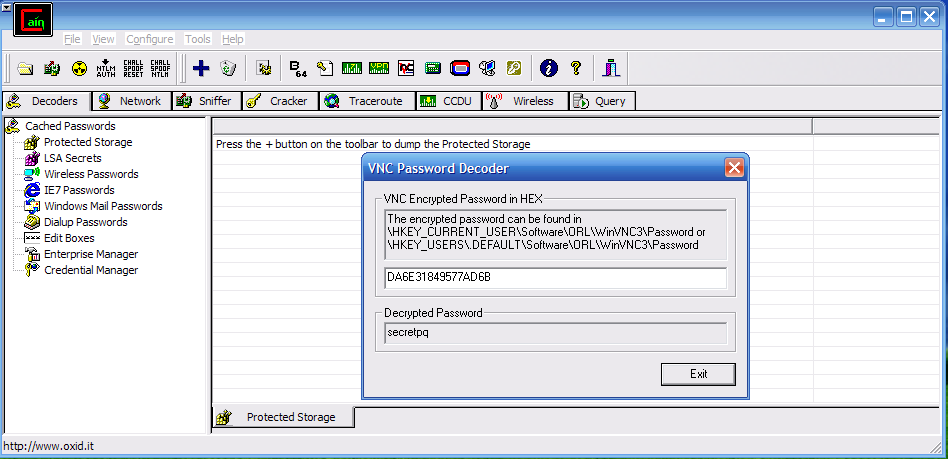
As a bonus, we can also decrypt it using Cain&Abel:
Hope you liked it,
m_101
Resources
- Plugins: Volatility plugins
- Tool: Memoryze
- Write-up: Forensic100